
Screenshots
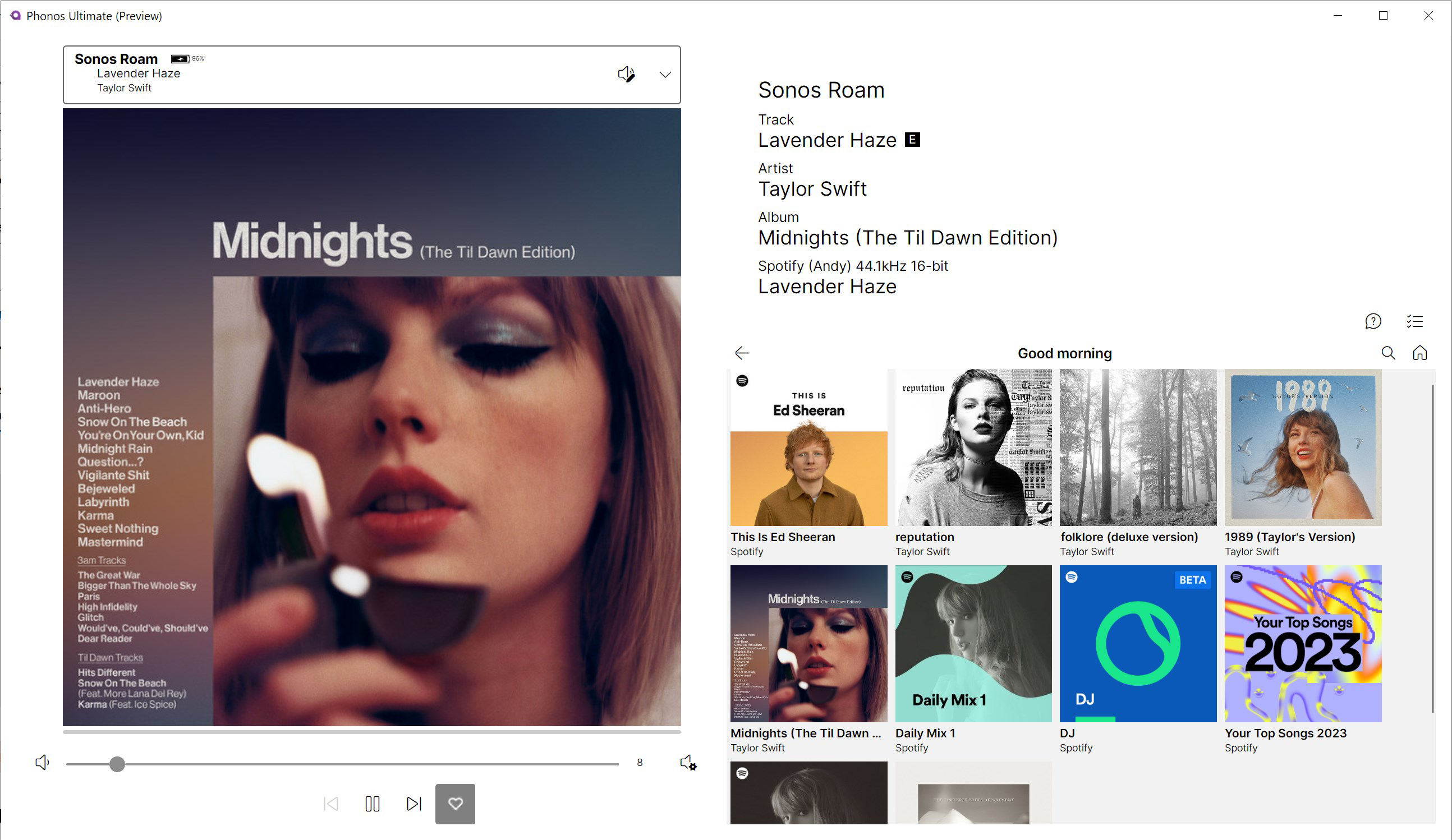
App details
- Updated
- 2024-11-06T04:29:59.8837595Z
- Requires
- Windows 10 version 17763.0 or higher
- Language
- English
- Developer
- ControlAV
- Category
- Mobile
SoftPas in:
This product is also available in the following languages:
About Phonos Ultimate (Preview)
Download Phonos Ultimate (Preview) – Sonos-Compatible, Open Source, Reliable Control Tool
Overview
Phonos Ultimate (Preview) is a mobile application designed to serve as a reliable control interface for Sonos audio systems. Its primary purpose is to offer users a stable and efficient way to manage their Sonos devices, focusing on consistent performance over flashy design. While it does not support the initial setup of Sonos equipment, it functions as a complementary tool for users who already have their systems configured through the official Sonos app. This makes it particularly useful for individuals seeking a lightweight, dependable alternative for daily use.
The app targets audiophiles, home automation enthusiasts, and users who value open-source transparency and long-term stability. It is especially suited for those who prefer a no-frills interface that prioritizes function over form. Although the developer did not provide additional background information, the app’s open-source nature suggests community-driven development, which may foster long-term sustainability and adaptability.
Real-world use cases include managing playback across multiple rooms, switching between audio sources, and controlling volume levels from a mobile device. In the broader app ecosystem, Phonos Ultimate fills a niche for users who want a dependable, third-party Sonos controller without relying on the official app. Its focus on reliability positions it as a valuable utility for those seeking a stable listening experience.
Key Features & Functionality
- Reliability-First Design: The app is engineered to maintain a stable connection with Sonos systems, reducing disconnections and playback interruptions. This is especially beneficial in environments with fluctuating network conditions.
- Open Source Transparency: The source code is publicly available on GitHub, enabling users to inspect, audit, or contribute to the project. This fosters trust and allows developers to adapt the app for custom needs.
- Simplified User Interface: The interface prioritizes ease of use with minimal navigation steps. Users can access core functions—play, pause, skip, volume control—without unnecessary complexity.
- Device Management: Supports control of multiple Sonos speakers across different zones, allowing seamless audio switching between rooms.
- Independent Operation: Functions without requiring the official Sonos app to be running in the background, reducing resource usage and potential conflicts.
For example, a user with a multi-room Sonos setup can quickly switch from playing music in the living room to the bedroom using just a few taps. The app’s streamlined layout ensures that even infrequent users can operate it confidently. While it lacks advanced features like voice integration or custom presets, its core functionality remains robust and consistent.
Interface, UX & Performance
Phonos Ultimate (Preview) adopts a minimalist interface that emphasizes functionality over visual polish. The layout is straightforward, with clearly labeled buttons for playback controls and device selection. Navigation is linear and intuitive, minimizing the need for onboarding or tutorials. Users can access essential features with minimal screen transitions, contributing to a smooth user experience.
Although the developer did not list formal performance metrics, the app appears optimized for consistent responsiveness across various device categories. It maintains stable operation even during prolonged use, suggesting efficient memory management and low background resource consumption. The interface adapts well to different screen sizes, ensuring usability on both smartphones and tablets.
Stability is a key strength. Users can expect minimal crashes or freezes, particularly when managing playback across multiple zones. The app’s lightweight nature contributes to its reliability, making it suitable for older devices or those with limited processing power. However, specific performance data, such as load times or battery impact, were not disclosed by the developer.
Platform Compatibility & Technical Requirements
Phonos Ultimate (Preview) is available for Android devices. The app supports the latest version of the Android operating system, though specific version requirements were not listed. The file size is approximately 15.2 MB, making it a lightweight download suitable for devices with limited storage.
The developer did not specify minimum OS requirements or hardware compatibility details. As such, users should ensure their device meets general Android standards for app installation. Compatibility with iOS devices was not confirmed, and no information was provided about support for tablets or wearables.
Pros and Cons
Pros
- Reliable and stable connection to Sonos systems
- Open-source code enables transparency and community contributions
- Minimalist interface reduces learning curve and improves usability
- Lightweight design with low storage and memory footprint
- Does not require the official Sonos app to be active for operation
Cons
- Does not support initial setup of Sonos devices
- Limited to basic playback and device control functions
- No official support or endorsement from Sonos, Inc.
- Interface lacks modern visual design elements
- Unsupported on iOS platforms
FAQ
Is Phonos Ultimate (Preview) safe to download and use?
The app is open-source, meaning its code is publicly available for review. This transparency enhances trust, allowing users to verify its safety. However, as it is not officially affiliated with Sonos, users should ensure they download it from trusted sources.
Can I use Phonos Ultimate (Preview) to set up my Sonos system?
No. The app does not support the initial configuration or setup of Sonos devices. Users must use the official Sonos app for that purpose.
Is the app available for iOS devices?
As of now, there is no confirmed iOS version. The app is currently available only for Android.
How often is the app updated?
Update frequency is not publicly disclosed. However, being an open-source project, updates may be released based on community contributions and developer activity.
Does Phonos Ultimate (Preview) require internet access?
Yes. The app requires a stable network connection to communicate with Sonos devices, as it relies on the local network for control and playback management.
Final Thoughts
Phonos Ultimate (Preview) stands out as a dependable, no-nonsense tool for managing Sonos systems. While it lacks the visual flair and advanced features of official apps, its focus on stability, simplicity, and open-source transparency makes it a compelling choice for users who prioritize reliability. It is not a replacement for the official Sonos app but serves as an excellent supplementary tool for those seeking a lightweight, efficient control interface.
Its open-source nature invites trust and long-term sustainability, while its minimal design ensures ease of use for all skill levels. Though it does not support setup or advanced features, its core functionality remains solid and consistent. For Android users with existing Sonos systems, this app offers a secure, lightweight alternative that enhances daily control without unnecessary overhead.
Download Phonos Ultimate (Preview) now to experience a reliable, community-driven way to manage your Sonos audio setup.
Guides & Tutorials
How to install Phonos Ultimate (Preview)
- Click the Download button above.
- Once redirected, accept the terms and click Install.
- Wait for the Phonos Ultimate (Preview) download to finish on your device.
How to use Phonos Ultimate (Preview)
This software is primarily used for its core features described above. Open the app after installation to explore its capabilities.
User Reviews
No reviews yet. Be the first to share your experience.
You may also like
more
Que no te pillen¡
About !Que no te pillen¡Reviewed by Jason A. BilbreyShow MoreShow Less

3D Combat Zone
About 3D Combat ZoneOriginally released in 1983, 3D Combat Zone immerses players...

666: El día del portal
About 666: El día del portalOn June 6, 2006, Agent P. Stone uncovers a sinister...

80 in 1 Best Flash games
About 80 in 1 Best Flash games 80 in 1 Best Flash games is a collection of 80 fl...

ABYSS SEEKERーーWhat Do You See Deep in The Abyss
About ABYSS SEEKERーーWhat Do You See Deep in The AbyssIn ABYSS SEEKER, players...

ACA NEOGEO THE KING OF FIGHTERS 2002 for Windows
About ACA NEOGEO THE KING OF FIGHTERS 2002 for WindowsTHE KING OF FIGHTERS 2002,...